Your business can appear on Google Maps while its website is difficult to find in organic search. A Business Profile and an indexed website page are different search surfaces. Seeing one does not establish the visibility of the other.
Start by checking which website address the profile links to, whether the intended page is publicly available and what Google Search Console reports for that exact URL. Then assess the searches and pages involved before deciding what needs changing.
A missing result in one personal search is useful context, but it is not enough to diagnose a website-wide indexing or ranking problem.
First, identify what you are seeing
Write down the search phrase, date, approximate location, device and result type. Are you seeing a Maps listing, a business information panel, an advert or an ordinary website result?
Also distinguish searching for the exact business name from searching for a broad service. A company may appear for its name while remaining hard to find for a competitive service query.
| Observation | Useful next check |
|---|---|
| The profile appears, but its website button goes to the wrong place | Check the linked address and intended destination |
| The website opens directly, but a page is absent from search | Inspect that URL in Search Console |
| The business appears for its name but not a service query | Review relevant page content and search performance |
| An old page appears instead of the intended page | Review the old and new addresses, redirects and canonical information |
These observations suggest different investigations. They do not all require a new website or a new Business Profile.
1. Check the website link on the profile
Open the website link as a visitor. Confirm that it leads to the intended business, location and current page. Check whether an unexpected redirect, expired address or unrelated destination interrupts the route.
If the business has several locations, agree which page should serve each relevant profile. Use the actual operating arrangements rather than creating location pages that imply premises or services the business does not have.
Google Business Profile guidance emphasises accurate business information. Correcting that information is useful for customers, but it does not by itself resolve every issue affecting the website’s search visibility.
2. Confirm that the intended page is public
Check the page without relying on an administrator’s preview. A draft, private page or development version may be visible to the website team while remaining unavailable to ordinary visitors.
Look for a clear page title and readable content. If the address produces an error or an unexpected login screen, investigate that availability problem before judging its search performance.
For an existing site, record when the problem began and any relevant changes: a redesign, domain move, page replacement or publication-setting change. That timeline helps a technical review.
3. Use URL Inspection for the exact page
Google Search Console‘s URL Inspection tool reports information about Google’s indexed version of a page and can test its current availability for indexing. Inspect the complete address within the appropriate verified property.
Read the stated reason rather than treating every excluded page as a fault. A redirect, an alternative canonical page and an unintended indexing block require different responses.
The indexed report and a live test answer different questions. A successful live test is not a guarantee that the page is indexed or will appear for a particular search.
4. Review indexing instructions with context
A developer should assess any relevant indexing instructions and restrictions. Some pages are intentionally private or excluded from search. Others may have retained settings from a development environment unintentionally.
Confirm the intended public status before making changes. Do not remove restrictions from a private portal merely because a public service page is missing from search.
Where several addresses represent similar content, check which address is intended to be the main page and what Google reports as its selected canonical. Keep the investigation tied to the actual page.
5. Check whether the page answers the search
An indexed page still needs to be a useful answer for the query. Ask whether it explains the relevant service, intended customers, genuine operating area and appropriate next step.
A broad homepage may not give a prospective client enough detail about a specialist service. On the other hand, producing several nearly identical pages for small keyword variations may add little value.
My BIUC Industrial Services website project illustrates organising several capabilities into useful destinations. That is a content-structure example, rather than evidence of a measured ranking change.
6. Review actual search performance
Use available Search Console data to review queries and pages over a suitable period. Keep business-name searches separate from broader service questions where practical.
A single search on your own device cannot describe every customer’s results. Compare observed searches with the site’s recorded visibility and account for the date and location context.
Do not infer that the Maps profile is responsible for the website’s position just because both appear on the same results page. They need their own relevant checks.
A practical example from Mita School
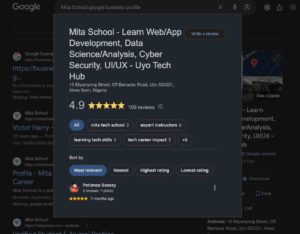
The featured screenshot of Mita School’s Business Profile shows a real profile surface. It is useful for explaining where a visitor may find a business and continue to its website.
It is not an indexing report for Mita School, a comparison of rankings or a record of enquiry growth. Those questions need the relevant search and business records.
Check the profile, the linked page and the search evidence separately, then connect the findings into a practical action plan.
What should you fix first?
Begin with a wrong website link or an unavailable public page. Then resolve confirmed technical obstacles and review the information needed for the intended audience.
When appropriate, the authorised site team can request indexing after a meaningful fix. Repeated requests are not a substitute for resolving the underlying issue, and they do not guarantee placement for a keyword.
Keep a record of the URL, observed problem, supporting report, change made and follow-up date. Review the result before commissioning further work.
Questions to ask an SEO provider
- Which exact page and search question are we investigating?
- Is the issue availability, indexing, relevance or something else?
- What evidence supports the proposed fix?
- Which pages are intentionally private or excluded?
- How will we review the change without promising a ranking?
My SEO and local search positioning, website care and content development services address different parts of this review. Explore my selected work for project context.
Frequently asked questions
Does a verified Business Profile mean my website is indexed?
No. Profile representation and website indexing need separate checks.
Should I create another profile to make the website appear?
Do not create duplicate profiles as a workaround. Review the existing business information and the website issue through the appropriate tools.
Will requesting indexing guarantee a first-page position?
No. An indexing request does not guarantee indexing or a particular ranking.
Research checked 3 November 2026: Google Search Console, URL Inspection (support.google.com/webmasters/answer/9012289), and Google Business Profile, business representation guidance (support.google.com/business/answer/3038177).
Discuss your website or digital project
Send me your current website, the problem you want to solve and the people you need to serve. We can review the requirement and agree a practical scope, timing and quotation.
- WhatsApp: Start a conversation on WhatsApp.
- Contact page: Send a project enquiry.
- Email: [email protected].
- Phone: +234 703 799 7791.
Based in Uyo, Akwa Ibom State, Nigeria. Remote working arrangements can be discussed.